Use a Local Ollama Model with Fabric
Fabric has a first-class, keyless Ollama (Local) provider. It discovers
installed models with Ollama's native /api/tags catalog and runs chat, tools,
thinking, images, and streaming through native /api/chat; you do not need to
pretend that Ollama is a custom OpenAI endpoint. Local Ollama and Ollama
Cloud remain different routes: this guide uses provider: ollama and an
Ollama server root on your machine or private network, not ollama-cloud and
not a /v1 URL.
First success: connect a local model
This is the shortest working path. Your model must expose reliable tool calling and a real context window of at least 64,000 tokens; Fabric recommends 65,536. A model that only produces text is not enough for agentic file, terminal, browser, or delegation work.
1. Start Ollama
Start Ollama with a 65,536-token runtime window in a separate terminal. If the Ollama desktop app or a service manager already owns the daemon, configure the same context value there instead of starting a second server.
OLLAMA_CONTEXT_LENGTH=65536 ollama serve
2. Pull a model
Choose an Ollama model whose metadata reports at least 64,000 context tokens
and tool support, then replace YOUR_MODEL with its complete ID and tag:
ollama pull YOUR_MODEL
ollama list
3. Select it in Fabric
Create a dedicated profile (skip the first command if local already exists),
then open Fabric's model picker:
fabric profile create local
fabric -p local model
Choose Ollama (Local), keep http://127.0.0.1:11434 when Ollama is on this
machine, and select the model you just pulled. Do not add /v1. The same flow
is available from the dashboard's Models page:
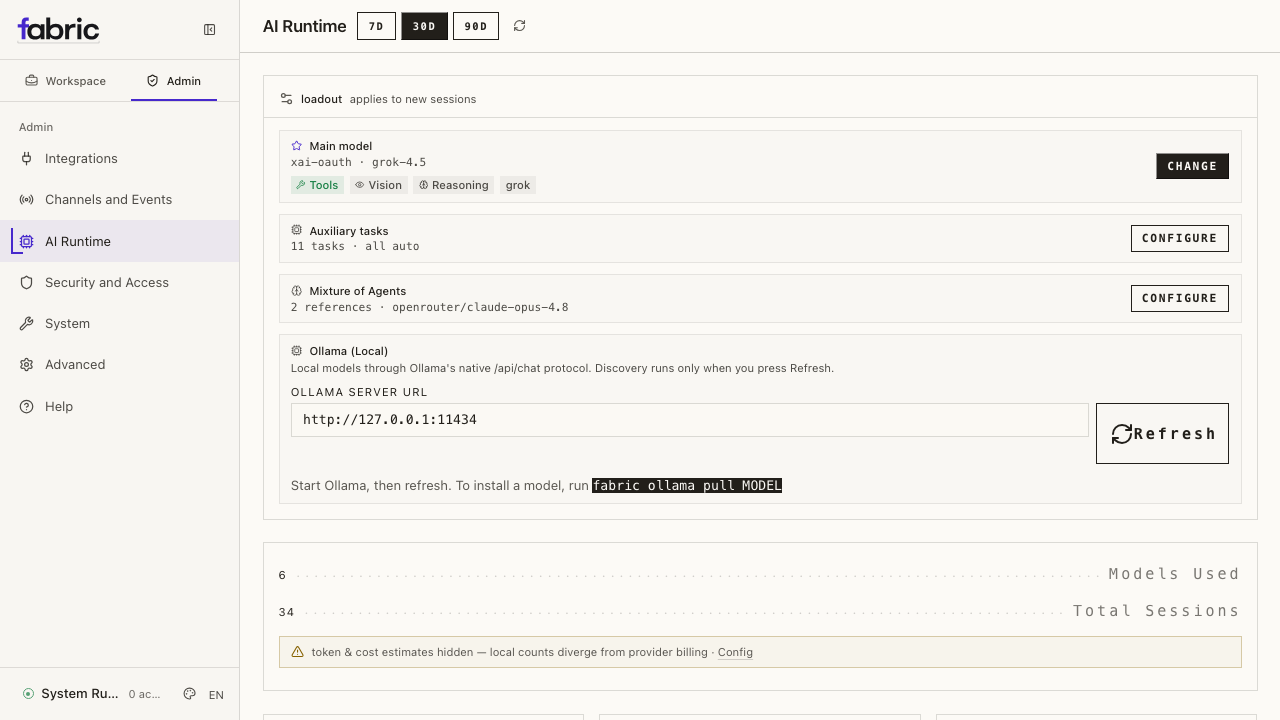
The actual dashboard Models page with a local Ollama route connected and ready to select.
4. Verify before relying on it
Run the deep readiness check, then test both a plain response and one small, reversible tool action:
fabric -p local status --deep
fabric -p local chat
In chat, ask for a short response first. Then ask Fabric to list files in the current directory. A successful text reply alone does not prove that tool calling works. If readiness reports less than 64,000 tokens or no tool support, adjust the Ollama model/runtime or select a different model before continuing.
When the selected endpoint is loopback, Fabric also enables the profile's
application-level local_ai policy so participating AI work cannot silently
move to a remote provider. See Understand the local_ai boundary
after the detailed setup when locality is part of your security requirements.
What Fabric requires
You need:
- Fabric installed and available as
fabric; - Ollama installed and running;
- the exact Ollama model ID and tag you intend to use;
- a literal address Fabric can reach (
127.0.0.1is preferred when both processes share a network namespace); - enough network bandwidth and disk capacity for that model pull;
- a model/runtime combination supported by Ollama's native
/api/chatroute; - reliable function/tool calling if you want Fabric to edit files, run commands, browse, delegate, or use other tools; and
- an actual runtime context window of at least 64,000 tokens. A practical configured value is 65,536.
The model catalog proves that a model is served; it does not prove that the model can call tools correctly. Verify tool use after connecting it.
1. Prepare Ollama
Install Ollama using its platform instructions, then verify the service. Replace
YOUR_MODEL in this guide with the exact ID, including its tag.
ollama --version
If Ollama is not already managed as a background service, start it in a separate terminal:
ollama serve
Create an isolated Fabric profile if you do not already have one, then use Fabric's foreground pull command:
fabric profile create local
fabric -p local ollama pull YOUR_MODEL
ollama list
The pull command confirms before it starts, streams allowlisted progress, and
verifies the installed model's final canonical digest from a fresh Ollama
catalog read. In a non-interactive shell, --yes is required and should be
added only after someone explicitly approved the network and disk operation.
There is no API-key flag; a matching configured endpoint may reuse that
profile's stored access policy without printing or persisting it.
This first command is deliberately foreground-only. Ctrl+C cancels Fabric's
client request and exits 130, then performs a bounded reconciliation. It does
not claim the daemon stopped immediately, and it never deletes daemon-owned
partial layers automatically. Exit 0 means the final installed digest was
verified; exit 1 means validation or pull failure.
fabric ollama pull does not select the model in Fabric or edit
config.yaml. Continue with the connection step below after it succeeds. The
optional --host accepts localhost or a literal loopback/private IP only;
DNS hostnames currently fail closed to prevent rebinding between authorization
and the POST. For a hostname-only container route such as
host.docker.internal, use the native ollama pull YOUR_MODEL command in the
Ollama host/network namespace, then configure that hostname for inference as
described later in this guide.
Check the native Ollama catalog Fabric uses:
curl -fsS http://127.0.0.1:11434/api/tags
The response should contain your exact model ID. You can also test native chat before involving Fabric:
curl -fsS http://127.0.0.1:11434/api/chat \
  -H 'Content-Type: application/json' \
  -d '{
    "model": "YOUR_MODEL",
    "messages": [{"role": "user", "content": "Reply with READY"}],
    "stream": false,
    "options": {"num_predict": 16}
  }'
2. Give the model enough context
Fabric rejects a model whose detected context window is below 64,000 tokens for
agentic work. For Ollama, Fabric queries /api/show, prefers an explicit
num_ctx from the model's Modelfile when present, and otherwise reads the model
metadata. It sends the resulting num_ctx in chat requests.
Configure Ollama to serve at least 65,536 tokens. One option is to start the server with Ollama's context setting:
OLLAMA_CONTEXT_LENGTH=65536 ollama serve
For a model-specific setting, create an Ollama Modelfile:
FROM YOUR_MODEL
PARAMETER num_ctx 65536
Then create and use the derived model ID:
ollama create YOUR_MODEL-64k -f Modelfile
Do not declare a context larger than the model and runtime can really serve.
Fabric's model.context_length is metadata used for budgeting; it is not proof
that the backend can honor that window.
3. Connect Fabric
Command line
The interactive model flow is the preferred setup path because it verifies the native Ollama endpoint, discovers installed models, and saves the provider and server root together.
For an isolated local-model profile (create it first if you skipped the pull step above):
fabric profile create local
fabric -p local model
In the picker:
- Choose Ollama (Local).
- Accept
http://127.0.0.1:11434, or enter another approved Ollama server root. Do not add/v1. - Fabric explicitly reads
/api/tags; merely opening the provider picker does not contact the daemon. - If the catalog is empty, enter the exact model ID/tag to pull. Fabric asks for a second network-and-disk confirmation and keeps the pull in the foreground.
- Select the exact installed model. Multiple models always require an explicit selection.
- Confirm the model. Fabric saves
provider: ollama, the native server root, and no API key orapi_mode.
Omit -p local to configure the default profile.
When the selected server is loopback (localhost, 127.0.0.1, or ::1), the
setup flow also enables security.egress_mode: local_ai for that profile. A LAN
server is not auto-authorized: add only its narrow private CIDR, then enable
local_ai yourself.
When you confirm an Ollama model through the classic CLI, the TUI/desktop chat
model picker, or a messaging-gateway model action, Fabric runs a bounded
readiness preflight before it applies the switch. A model that is installed but
reports fewer than 64,000 context tokens, reports no tool support, or is missing
is refused with a specific remedy. Fabric does not tell you to override the
model above the maximum Ollama reports. If the daemon is temporarily offline,
Fabric preserves the useful configure-now/start-later workflow: it warns that
readiness is unverified and directs you to fabric status --deep instead of
pretending the model is ready.
Merely opening a model picker remains probe-free. The preflight starts only after an explicit selection, so browsing models cannot unexpectedly contact a local endpoint. Desktop's first-time endpoint form and the dashboard's saved configuration path still require the deep status check below before you rely on the model.
Before starting chat, inspect the named profile's YAML. A loopback setup should
already show security.egress_mode: local_ai; a LAN setup needs the explicit
CIDR step shown below.
Desktop app
On first launch, choose Ollama (native local) directly from the provider screen. Or, after onboarding:
- Open Settings → Providers → Local models.
- Enter the Ollama server root, normally
http://127.0.0.1:11434. - Press Refresh. Discovery is explicit and reads native
/api/tags; opening Settings does not probe the daemon. - Select an installed model and press Apply. An empty catalog is rejected
with the exact
fabric ollama pull MODELremedy. - Apply the model to the profile you currently have selected. Loopback enables
that profile's
local_aimode automatically.
Use Local / custom endpoint only for vLLM, llama.cpp, an authenticated Ollama proxy, or another advanced OpenAI-compatible deployment. It is not the primary local Ollama path.
Web dashboard
Start the dashboard with:
fabric dashboard
The dashboard's Models page contains a first-class Ollama (Local) card.
It passively shows saved state without probing the network. Enter the native
server root, press Refresh to discover /api/tags, choose an installed
model, and press Use model. The server-side configure action performs a
fresh verification before persisting the selected profile.
For this first-class web path, the host must be localhost or a literal
loopback/private/CGNAT address; credentials, public addresses, metadata routes,
query strings, and fragments are rejected. Use the advanced custom-provider
flow for a deliberately authenticated reverse proxy.
The dashboard's schema-backed Config page also exposes
security.egress_mode and security.local_ai_allowed_cidrs. Save them on the
same selected profile. The dashboard cannot start after air_gapped is saved;
use fabric config, fabric status, or fabric doctor to return that profile
to online or local_ai.
Equivalent YAML configuration
The default profile config is ~/.fabric/config.yaml. A named profile such as
local uses ~/.fabric/profiles/local/config.yaml.
model:
  provider: ollama
  default: "YOUR_MODEL"
  base_url: "http://127.0.0.1:11434"
  context_length: 65536
  ollama_num_ctx: 65536

security:
  egress_mode: local_ai
  local_ai_allowed_cidrs: []
ollama_num_ctx tells Fabric what to send in native /api/chat
options.num_ctx. Keep context_length aligned with the window the daemon and
model can really provide; a larger configured number cannot create capacity.
The native provider is keyless. If your reverse proxy requires authentication,
configure an advanced custom endpoint instead. A cloud OAuth/device/identity
flow is not made local by pointing its model URL at Ollama. Inference under
local_ai will not mint or refresh a remote identity token, but an account
setup action that you explicitly start can contact its remote authorization
service.
Loopback needs no CIDR entry. If Ollama is on a trusted LAN or container bridge,
use its literal IP in model.base_url and approve the narrow containing network:
model:
  provider: ollama
  base_url: "http://192.168.50.20:11434"

security:
  egress_mode: local_ai
  local_ai_allowed_cidrs:
    - "192.168.50.0/24"
Only exact RFC1918, IPv6 ULA, or CGNAT networks are accepted. Public, link-local, metadata, documentation, multicast, and unspecified ranges are rejected. CIDRs are profile-scoped; approving a range in one profile does not authorize another.
4. Verify the route
Run the configuration check and deep Fabric diagnostics in the same profile:
fabric -p local config check
fabric -p local status --deep
fabric -p local doctor
fabric -p local memory status
In the status output, confirm Mode: local_ai, Enforcement: available, scope
ai_inference_routes, and the expected count of approved private CIDRs. Status
does not print the CIDR values. Doctor enters a restricted diagnostic view for
local_ai: it reports policy and memory state while skipping live provider,
OAuth, secret-vault, MCP, plugin, package-audit, container, SSH, and update
probes.
For a configured native Ollama candidate, fabric status --deep performs one
bounded, read-only Ollama readiness inspection. Explicit model switches on the
shared CLI/TUI/gateway path use the same sanitized capability facts before
commit. The inspection
distinguishes an unreachable daemon, the wrong server protocol, a missing
selected model, insufficient or unverified context, and reported tool/vision
support. When available, deep status also shows whether the model is loaded and
the VRAM bytes reported by /api/ps.
The Ollama readiness check does not pull or load a model, send a chat, execute a
tool, or prove that the whole process is offline.
Reported tools capability is daemon metadata. It is not a successful tool
call. Keep the Ollama curl checks above and an actual Fabric chat. Complete a
small reversible tool request as the end-to-end proof.
Then start a chat:
fabric -p local chat
First test plain inference with a short prompt. Then test a small, reversible tool action, such as asking Fabric to list files in the current directory. A successful text response alone does not verify tool calling.
If the endpoint has multiple models and you want to revisit the selection, run:
fabric -p local model --refresh
Once local_ai is active, model-picker inventory and labels use strict profile
configuration before discovery. Fabric does not cold-fetch models.dev or a
remote provider catalog merely to render or enrich the picker, and it does not
run Ollama readiness merely to open the picker. The bounded readiness request
belongs to the later explicit-selection action.
Advanced: understand the local_ai boundary
security.egress_mode: local_ai covers primary inference, live model changes,
auxiliary work such as title generation and compression, fallback, delegation,
and every Mixture-of-Agents slot. Each participating route must use a canonical
literal loopback address or a literal private address inside a CIDR approved by
this profile. Fabric does not use DNS, environment proxies, or redirects to turn
that approved route into another destination.
Built-in MEMORY.md and USER.md continue to work. External memory adapters
are unavailable in this first milestone and are stopped before import,
initialization, health checks, prompt contribution, recall, or writes.
Fabric does not currently enforce a global no-egress mode. local_ai is an
application boundary for the participating AI paths described above. It does
not block web/browser tools, MCP servers, plugins, networked skills, terminal
commands, messaging gateways, installs, updates, Ollama model downloads, or a
user-initiated OAuth or device-code setup. A trusted local server could also
proxy a request onward without Fabric knowing.
air_gapped is a reserved, configured-but-unavailable mode. Selecting it blocks
Fabric runtime startup with reason whole_process_network_boundary_missing;
it does not activate an air gap. A whole-process claim still requires a verified
host/container/network boundary and packet-level evidence.
Profiles and isolation
Model selection, endpoint credentials, memory state, sessions, skills, and
configuration are profile-scoped. Always use the same -p PROFILE on setup,
verification, and chat commands. The egress decision and approved CIDRs are
also re-read from that profile for each route decision; they are not cached
globally. A clean profile makes the intended boundary easier to audit.
Inspect the local profile before treating it as a restricted deployment:
fabric -p local config show
fabric -p local fallback list
fabric -p local memory status
fabric -p local mcp list
fabric -p local tools --summary
Built-in MEMORY.md and USER.md memory stay under the profile home and remain
active under local_ai unless their individual memory settings are disabled.
A selected external memory provider appears as unavailable and Fabric does not
import or probe its adapter. In online, that same provider can send content to
its configured service. Skills are instructions stored with the profile, but a
skill may direct Fabric to use a networked tool or command; installing or
reading a skill is not an egress guarantee.
Docker and remote-host URLs
Inside a Fabric container, 127.0.0.1 refers to that container, not to the
Docker host. In online mode, common hostname routes include:
- Docker Desktop commonly provides
http://host.docker.internal:11434; - on Linux, add a host-gateway mapping or use the host's reachable address; or
- if Ollama is another Compose service, use its service name, for example
http://ollama:11434.
Ollama must also listen on an interface reachable from the Fabric container. Do not publish an unauthenticated Ollama port to an untrusted network.
Those hostnames are deliberately rejected by local_ai; a DNS answer is not an
authorization boundary. For local_ai, use a stable literal address reachable
from the Fabric container and approve its narrow RFC1918/ULA/CGNAT CIDR. If the
only route is a hostname, keep the profile in online or change the container
network design. Do not weaken the policy with a public or link-local range.
Review traffic outside the local-AI boundary
Use this checklist when locality matters:
| Path | What to verify |
|---|---|
| Primary model | model.provider is ollama; model.base_url is the intended native Ollama server root; status reports local_ai available. |
| Model changes and auxiliary work | Model switching, auxiliary.* assignments (including title/compression), delegation, and every MoA slot must pass the same local address policy. |
| Fallbacks | A remote fallback_providers candidate is skipped under local_ai; an authorized local candidate can still run. Fallback never overrides egress policy. |
| Memory | Built-in memory remains available. Every external memory adapter is blocked in this milestone, even if it could theoretically run locally. |
| Account setup | A CLI/dashboard OAuth or device-code flow that you explicitly start may contact its remote authorization service; local_ai governs inference-time identity resolution. |
| Web and browser | web_search, web_extract, and navigation to internet URLs make network requests. |
| MCP, plugins, and skills | Review each enabled server or extension; they can call remote services or launch networked commands. |
| Terminal | A local terminal tool can still run curl, package managers, Git clients, or any other network-capable program. |
| Gateways | Telegram, Discord, Slack, email, and similar channels necessarily communicate with their services. |
| Lifecycle | Installs, updates, dependency downloads, and ollama pull require a source reachable over the network unless artifacts are mirrored locally. |
For a whole-process no-egress requirement, pair this review with an
outbound-deny firewall or container/network policy and allow only the endpoints
you intend. Fabric's air_gapped mode will remain unavailable until Fabric ships
and packet-tests that deployment boundary.
Troubleshooting
Fabric reports hostname_not_allowed
local_ai does not authorize DNS names, including private names that currently
resolve to a private address. Use 127.0.0.1 when Fabric and Ollama share a
network namespace. Otherwise use a stable literal private IP and add its narrow
containing CIDR to security.local_ai_allowed_cidrs.
Fabric reports address_not_approved
The URL is a literal address, but it is neither loopback nor inside an approved profile CIDR. Inspect the selected profile, confirm the address is RFC1918, ULA, or CGNAT, and add only the exact network you control. Fabric will not accept a public, link-local, metadata, documentation, multicast, or unspecified range.
An external memory provider is unavailable
This is expected in the first local_ai milestone. Run
fabric -p local memory status or fabric -p local doctor; each reports the
policy block without importing or probing the adapter. Continue with built-in
memory, or deliberately switch the profile to online after reviewing that
provider's data route.
Runtime startup is blocked in air_gapped
This is an honest unavailable state, not a successful air-gap activation. Run
fabric -p local status or fabric -p local doctor, then use fabric config
or edit that profile's config.yaml to choose local_ai or online. Runtime
entry points remain blocked until the mode changes.
Connection refused
Confirm that Ollama is running and that the URL is reachable from the same host or container where Fabric runs:
curl -fsS http://127.0.0.1:11434/api/tags
Use the Docker guidance above when the two processes do not share a network
namespace. Use the Ollama server root; do not add /v1.
The endpoint is reachable but advertises no models
Run ollama list, pull or create the intended model, and inspect /api/tags
again. Desktop and web intentionally refuse to save an empty native catalog.
The CLI can offer a foreground pull, but it persists the model only after a
fresh native catalog proves the installation.
Model not found
Copy the complete ID from ollama list or /api/tags, including its tag.
Refresh Fabric's provider catalog with fabric -p local model --refresh.
Context window is below the minimum
Increase the real Ollama runtime window, reload or recreate the model, and keep
model.ollama_num_ctx plus model.context_length aligned with it. Fabric
requires at least 64,000 tokens for reliable tool use and reports the detected
runtime value instead of accepting a stale larger cache entry.
The model replies but does not use tools
The catalog's reported tools capability is metadata, not a successful tool
call. Test the same model through native Ollama tool calling, check that its
template supports tools, or choose another installed model. Do not add a cloud
fallback while diagnosing this if your goal is to keep inference local.
The dashboard does not show the endpoint
Confirm that you configured the same Fabric profile selected in the dashboard.
Use the dashboard's native Ollama card, confirm the selected profile, press
Refresh, and verify that model.provider: ollama plus the server root are
present in that profile's config.